
PNR Status: Check Your Indian Railways Ticket
Check your PNR status on the official Indian Railways enquiry page to see whether each passenger is confirmed, in RAC or on a waiting list. Keep your 10-digit reservation number ready, then read the latest result before making travel plans.
PNR stands for Passenger Name Record: the reference for your reserved train booking. This independent guide helps you read the result. A live checker is not available on this website yet.
Step by step
How to Check PNR Status Online
You can use the official enquiry page in a browser on your phone or computer. You do not need to install an app for this route.
Step 1
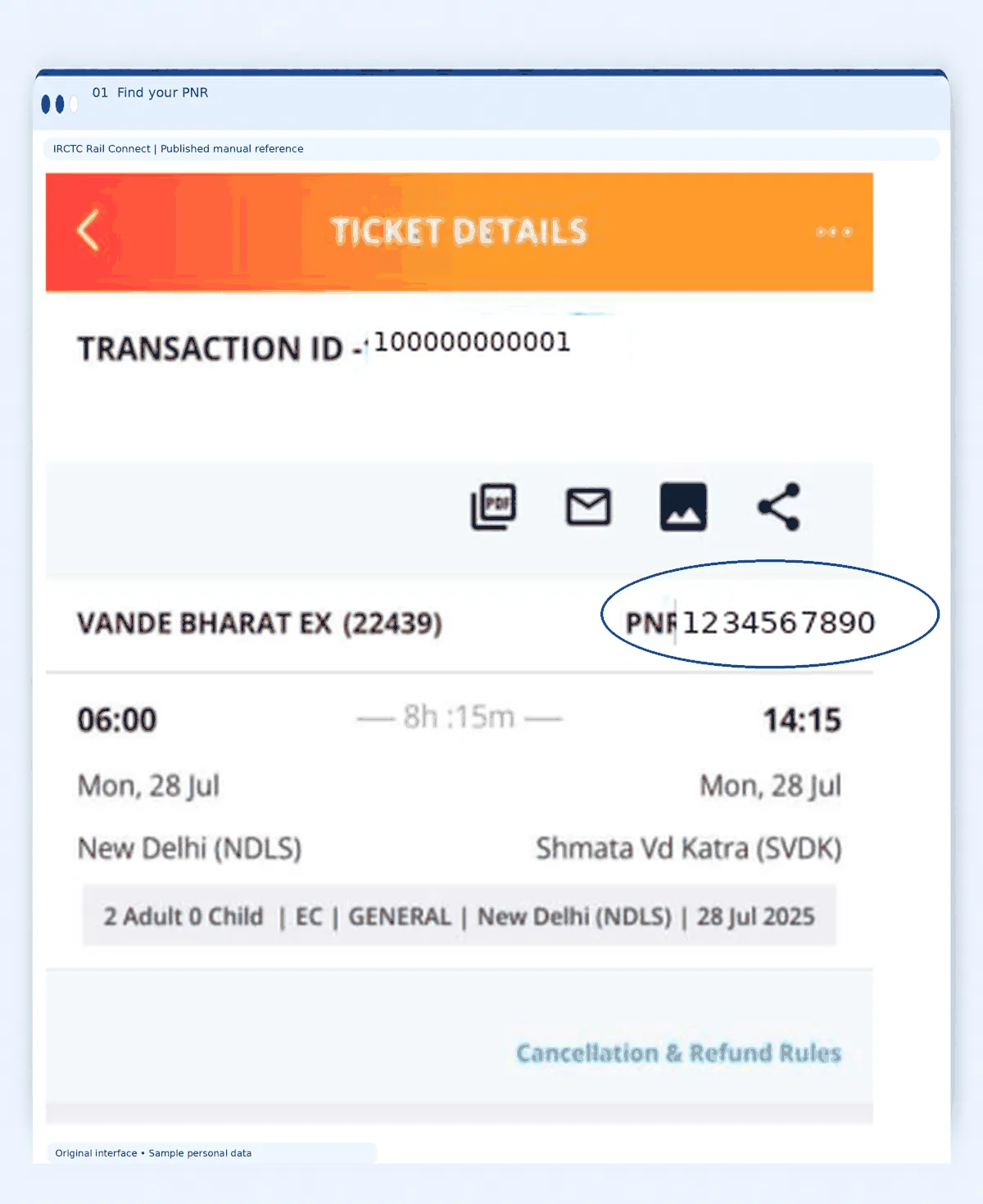
Find your reservation number
Find the 10-digit PNR on your reserved train ticket. Look near the top of the ticket for the PNR label. If you cannot find it, check the issued ticket in the booking account or the confirmation email or message. If an agent booked for you, ask for the issued ticket.
Step 2
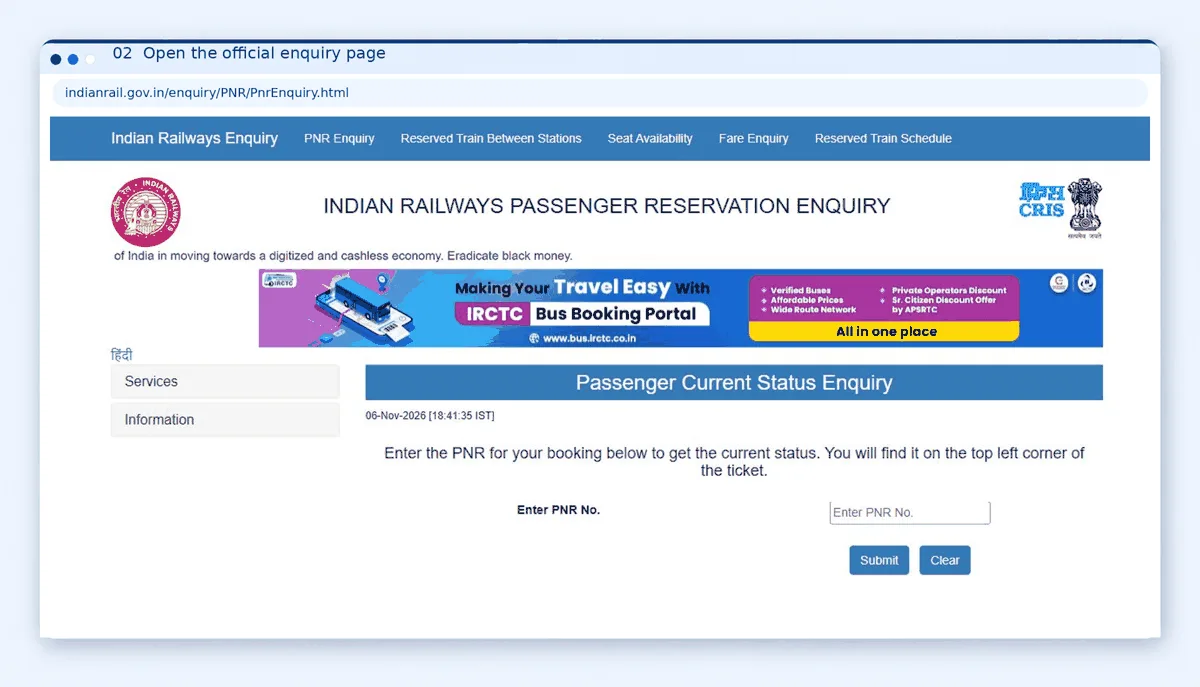
Open the official enquiry page
Open the Indian Railways Passenger Current Status Enquiry page using the official link above.
Step 3
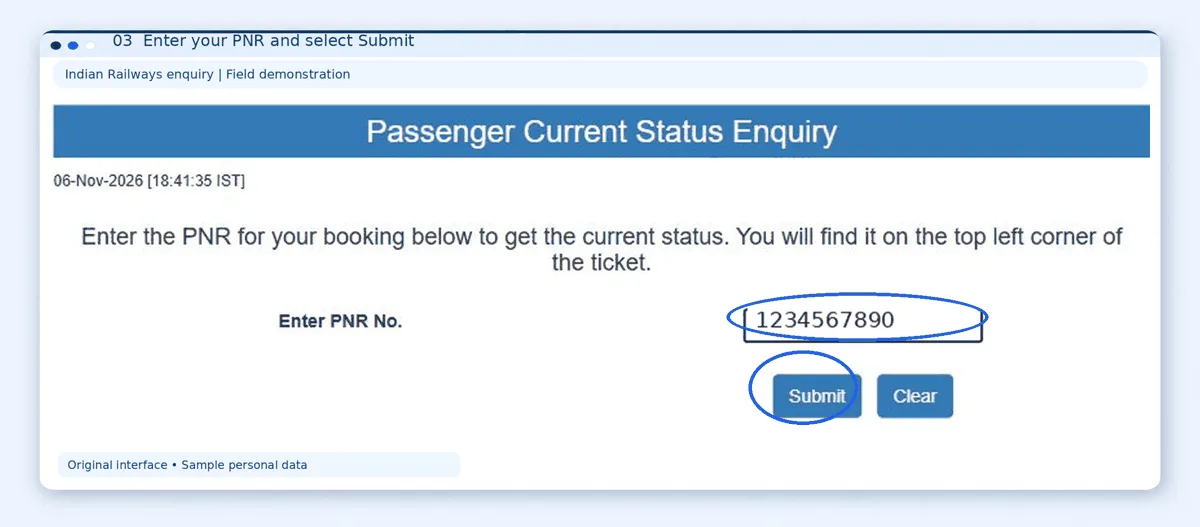
Enter the number
Enter the number carefully and select Submit. If a verification prompt appears, complete it on the official page and submit as directed.
Step 4
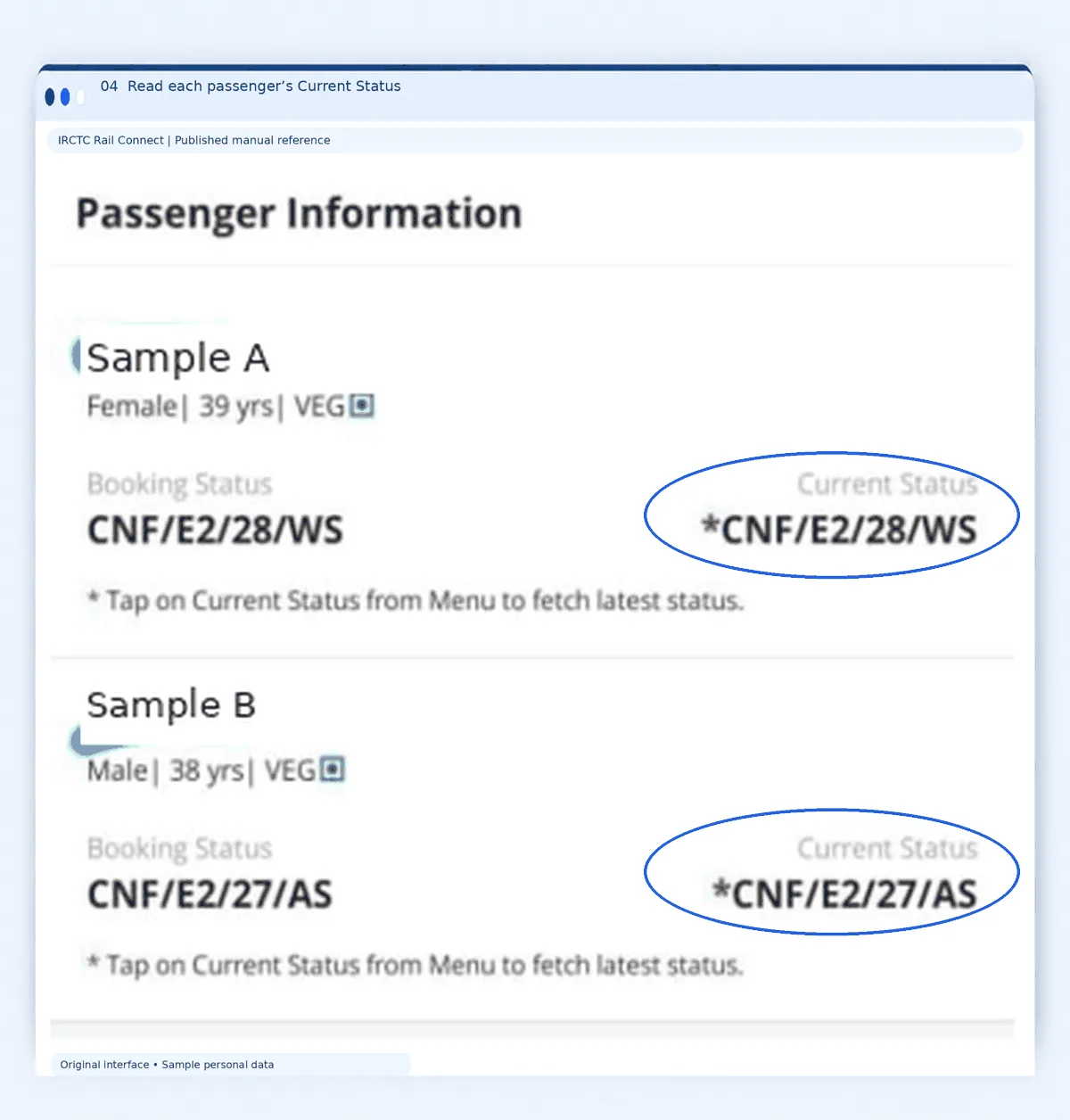
Submit and read the current result
Once the enquiry succeeds, check the journey details and Current Status for every passenger.
Step 5
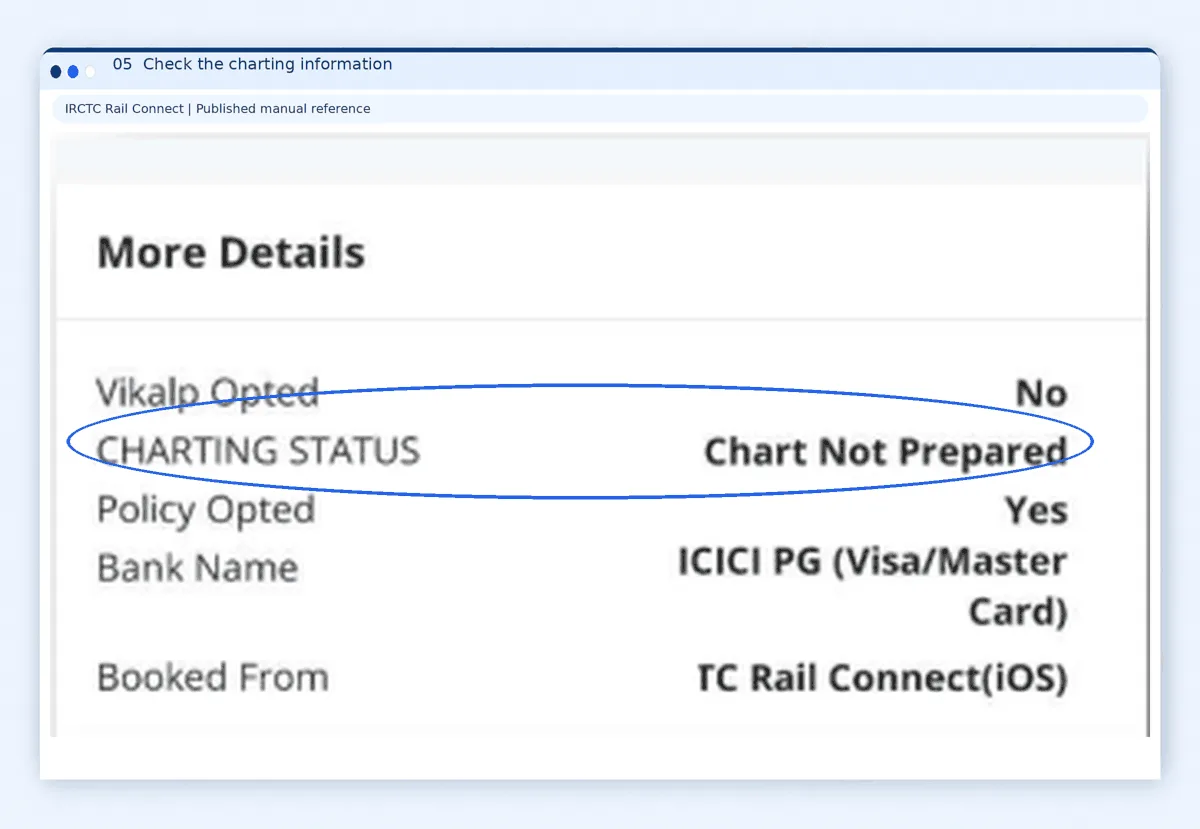
Check the charting information
Look at Charting Status. If charting is pending, return later for an updated result.
Already have an IRCTC booking? Keep the ticket confirmation or reservation slip handy while checking. Do not confuse your booking transaction reference with the PNR requested by the enquiry form.
Reading your result
How to Read Your PNR Status Result
Start with three questions: Is this the correct journey? What is each passenger’s current position? Has the relevant chart been prepared? Reading in that order helps avoid mistakes when a family booking contains different passenger statuses.
Compare the boarding date and boarding point with your ticket. Also check the class and the station up to which the accommodation is reserved. Do not assume that the train’s starting station is your boarding station.
Booking Status vs Current Status
Booking Status records the position assigned when you booked. Current Status shows the updated reservation position. A waiting-list entry in the first column does not mean you are still waiting if the second column now says CNF.
For example, Booking Status WL 18 and Current Status CNF means the passenger was waitlisted when booking but is now confirmed. This is an illustrative example, not a live passenger record.
CNF: Confirmed
Check the coach and berth allocation when available.
RAC: Reservation Against Cancellation
Travel is allowed on a valid RAC reservation; a full berth is not assured.
Read the full result
The official result also includes charting information and journey fields. Read any remarks alongside the passenger rows rather than treating a single code as the complete answer.
WL: Waiting List
Check the later result and the rules for your ticket type.
CAN / MOD
The passenger entry is cancelled or modified; review the full result.
Coach and Berth Details: What If They Are Missing?
Seeing CNF without a coach or berth number can be confusing. The official railway legend explains that these details become available after chart preparation. A blank allocation field alone does not turn a confirmed reservation into a waiting-list ticket.
Check again after charting and save the updated details for the journey. If the result still appears incomplete close to departure, ask railway enquiry staff for help rather than choosing a berth yourself.
Your coach identifier and berth number describe your accommodation. Check platform and train running information separately before heading to the station; a reservation confirmation is not a guarantee that a train will arrive on time.
PNR Status After Chart Preparation
Charting is an important checkpoint for your booking. Before final charts are prepared, Indian Railways warns that the displayed current position can still change, including an upgrade or downgrade.
Chart preparation times can vary by train and departure arrangements. Rather than relying on a fixed four-hour rule, check the Charting Status shown in the official enquiry result. If your journey is close and the information remains unclear, contact railway enquiry support.
If you board at an intermediate station, avoid simply counting back from your own boarding time. Keep checking the displayed chart information, especially when your accommodation has not yet been assigned.
Waitlist rules
Can You Travel if Your Ticket Is Still Waitlisted?
First identify whether the ticket is fully waitlisted or contains a mix of passenger statuses. Those situations need different handling.
Fully waitlisted e-ticket
If every passenger remains waitlisted after chart preparation, IRCTC drops their names from the chart. Do not board using that ticket. IRCTC arranges cancellation and an electronic refund under the applicable rules.
RAC reservation
Passengers with a valid RAC booking can undertake the journey. RAC does not promise a full sleeping berth.
Mixed family or group e-ticket
IRCTC says partly confirmed or partly RAC bookings with waitlisted passengers are included in the chart. This does not allocate a separate confirmed berth to everyone.
If someone on a mixed booking will not travel, check the official cancellation and refund procedure promptly. Do not assume that their fare will return automatically. Counter tickets also need their own cancellation handling; the fully waitlisted e-ticket rule should not be applied to them without checking.
For help with an IRCTC booking or refund query, use IRCTC eQuery or call 14646 within India. For railway enquiry and assistance, call 139. You can also raise journey-related complaints through RailMadad. Keep your ticket ready so support staff can identify the journey.
Predictions
What Confirmation Predictions Can Tell You
A confirmation estimate can help you consider backup plans, but it cannot reserve a berth. Indian Railways itself describes its prediction as indicative and warns that the actual outcome may differ.
Avoid treating a percentage or a small waiting-list number as a promise. Keep prediction labels separate from the passenger’s Current Status: a forecast is not the same as CNF. Keep an alternative travel plan if the journey is essential, and make decisions using the latest official reservation result. This website does not provide a confirmation prediction tool.
Troubleshooting
PNR Status Not Showing? Try These Steps
For an unresolved booking issue, contact the service that issued your ticket or IRCTC support. If official support requests your reservation number or mobile number, use its private channel. Avoid posting an unredacted ticket or contact details in a public comment.
- Check every digit against the ticket. Remove accidental spaces and make sure you have copied the reservation number.
- Confirm that a ticket was issued. A payment debit or transaction reference alone does not prove that the booking succeeded.
- If a third-party result looks old or conflicts with another result, make a fresh enquiry on the official railway page.
- If the official page fails to load, try again later or use railway enquiry support. An unavailable page alone does not establish whether a ticket is confirmed or cancelled.
Common questions
Frequently Asked Questions
Can I check PNR status by name or mobile number?
The public Indian Railways enquiry form asks for the PNR, rather than offering a name-only or mobile-number-only search. Locate your reservation number in your ticket records before using that form.
Is a confirmed result enough to replace my ticket?
Use the enquiry to review your reservation. Keep your actual ticket or authorised travel document and the required identification ready for travel; do not rely on a status page as a replacement.
Does one confirmed passenger mean the whole family is confirmed?
No. Read each passenger’s Current Status. People on the same booking can have different positions, so check every row before deciding what accommodation is available.
How often should I check a waiting-list booking?
Check periodically as departure approaches and again after charting. Repeatedly refreshing cannot improve your position. Use the time to consider alternatives if your travel plans depend on confirmation.
Can I make an enquiry without mobile internet?
Call railway enquiry on 139 for assistance. Indian Railways also publishes SMS enquiry information. Check current availability and mobile-network charges before using a messaging service.
Where can I read the full list of reservation codes?
Use the legend on the official enquiry page for the railway’s descriptions. The short table here focuses on the main decisions passengers need to make, rather than listing every waiting-list category.
Does WL1 mean my PNR status is confirmed?
No. WL1 is still a waiting-list position, not confirmation. Read the latest Current Status and chart information. For a fully waitlisted e-ticket after charting, follow the boarding rule above.
Check Your PNR Status Before Leaving
Review every passenger’s current position, confirm the boarding details and note any assigned accommodation. If something remains unclear, get official help before boarding. A final PNR status check gives you a clearer plan for the journey.
Information checked against Indian Railways and IRCTC sources on 6 November 2026. This website is an independent guide and is not affiliated with Indian Railways or IRCTC.